
Part 3: Building a Decision-Centric Productivity System - The Agentic Layer
In the first two parts of this series, I described how LENS works as a personal knowledge system.
Part 1 covered the core idea: a shift away from capturing everything and toward staying clear on what actually matters. Part 2 went into the mechanics: how information enters the system, why small notes beat long summaries, and why linking beats sorting.
Both pieces deliberately left one question open: where does AI fit in?
This is that piece.
 |
|---|
| Image by the author created in cooperation with MS Copilot |
Why AI makes sense here
The retention problem is real. According to Ebbinghaus, we forget roughly 70% of new information within a day. I encounter this constantly - not because I don’t pay attention, but because the volume is just high. A lot of information flows through my brain every week and most of it fades quickly.
LENS already helps with this. The aggregation layers keep the system scalable. But there’s a ceiling: it still needs curation, and retrieving non-obvious connections requires you to actively dig. That’s time-consuming, and it relies on you remembering that something exists in the first place.
Which brings me to the honest version of why I added an AI layer: I got tired of manually researching my own notes before every important meeting or decision. There had to be a better way.
I’ve been interested in AI since the early 2010s. Back then I mostly worked with classical machine learning and simple neural networks. Since 2020 the capabilities have shifted dramatically, and with LLMs I started seeing a real fit with knowledge work. Not for writing emails. For something much more useful: working with a personal knowledge base that’s already structured and maintained.
That’s what the agentic layer does.
What I use it for
Two things:
- Speeding up the creation of knowledge elements
- Working with the knowledge base: finding things faster, discovering non-obvious connections, and preparing for meetings without manual research
One important constraint I set myself early on: I don’t want LENS to depend on AI. AI is an addition that improves the system, not a requirement for it to function. If I switch tools or lose access temporarily, the system should still work.
The AI layer accelerates and enriches. It doesn’t replace any of the underlying structure.
Creating knowledge elements
The standard workflow
I built a simple agent that takes raw input (like meeting notes, slides, an email) and converts it into a LENS-compatible knowledge element. I instructed the agent on the format I want: YAML metadata at the top (date, area, subarea) and a consistent content structure. The output is a markdown file I can move directly to Obsidian.
Before the agent, I built every knowledge element manually from a template. Now the workflow looks like this:
- Open the agent
- Upload the raw input
- The agent produces a draft knowledge element
- I review and edit it
- Add it to the knowledge base
That saves me roughly five minutes per element. Across a month, that adds up to several hours.
The email workflow
About 20-40% of my knowledge elements originate from email, so I built a dedicated workflow for that.
When I receive an email that’s worth keeping, I move it to a dedicated folder: I think of these emails as knowledge candidates. Every two or three days I go through the folder, and anything worth converting I simply flag.
That flag triggers a Power Automate flow that creates a markdown file from the email. After a brief review, I copy it into LENS. No agent conversation required.
Working with the knowledge base
This is the part I had been wanting for years: actually using the knowledge stored in my system, not just the fraction of it still present in my working memory.
The manual alternative is what I’d call the “research your own notes” role: spending time before meetings or decisions digging through what you once knew explicitly. In information-dense environments, that’s a surprisingly large part of the job.
The agentic layer replaces most of that.
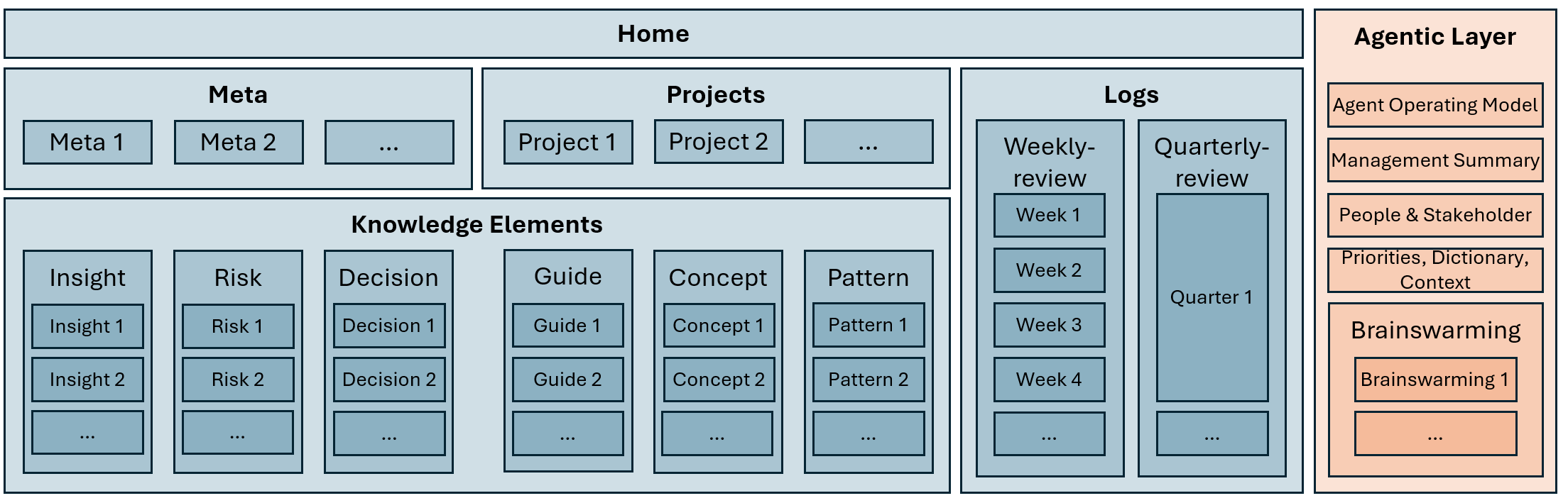
Because LENS already has aggregation layers (a home view, Meta-Pages, and atomic notes) the agent doesn’t need to brute-force everything at once. The hierarchy helps it work efficiently: it starts at the higher levels and retrieves deeper context only when necessary. That keeps the context window manageable and reduces noise.
There’s still a risk the agent misses something. But that risk is much smaller than the alternative, which is me doing a manual sweep I probably wouldn’t have time for anyway.
How I use it in practice
- Meeting preparation: I combine the meeting context (title, participants, topic) with the knowledge base. The agent surfaces what’s relevant without me having to specify where to look. I’ve also built a Power Automate workflow for this so it runs automatically. I’m looking forward to migrating this to a proper agent flow eventually.
- Weekly review: On Monday mornings, the agent runs through the knowledge base and surfaces the important active topics. It helps me reload context after the weekend without spending the first hour(s) re-reading notes.
- Presentation work: I don’t use plain chat for this anymore. The agent knows the context of the topics I’m working on and surfaces relevant connections at the right moments.
More use cases are emerging. I’ll document them as they settle into habit and will share them here!
The setup
The agent isn’t just connected to LENS and pointed at the files. That would give it data without context. For it to work well, it needs some grounding.
I added a dedicated folder to my LENS structure called Agent Documents. It contains:
- Agent Operating Model: The most important file. Essentially the agent’s work instruction: how it should interpret my knowledge, what it should prioritize, how it should format responses.
- Management Overview: High-level context about the department I lead, derived from a slide deck I prepared for my manager.
- People & Stakeholders: A structured overview of the people I work with regularly.
- Priorities: My current priorities at work.
- Dictionary & Broad Context: Abbreviations, background knowledge, and implicit context that the agent would otherwise have to guess at.
- Documents: Guidance on how to interpret the different document types the agent has access to (work instructions, reference docs, etc.).
 |
|---|
| LENS document hierarchy including the agentic layer, visualization by the author by |
Without something like this, retrieval works, but reasoning doesn’t. The agent produces output that’s technically grounded but contextually off. The Agent Operating Model closes that gap.
Limitations and the workaround
My agent is built on my Microsoft Copilot Pro license. It’s not a full custom agent like you’d build in Claude or Copilot Studio. But within its constraints, it works well.
The main limitation: it can only have persistent access to 50 files. That’s not much when the knowledge base has 200+ elements and grows by 15-20 per week.
Here’s roughly how my files break down:
| Layer | Files |
|---|---|
| Home | 1 |
| Inbox | max. 20 |
| Meta-Pages | 3 |
| Projects | 5 |
| Agent Documents | ~7 |
| Logs | 20 (growing) |
| Knowledge elements | 200+ |
| Documents | 20+ |
Total: 267+ files and well over the limit.
The solution: instead of giving the agent access to individual knowledge elements, I aggregate them into two proxy files:
- knowledge-elements-combined: the full text of all knowledge elements in a single file
- knowledge-elements-index: filenames with metadata, for when the agent needs to locate a specific element
That brings the count from 267+ down to around 69. Still over 50, so I temporarily exclude the documents layer, landing at 49. Tight, but workable.
What’s next on the setup
The logs are the next lever. Right now all 12 are in scope. My plan: include the last four weeks plus the last quarterly review, and aggregate the rest the same way I handled knowledge elements. That frees up more slots for documents, which I’ll bring in via the same index-plus-combined pattern.
Then I’ll end up with 46 files with full coverage. Some room left, which is useful as the system grows.
Where things stand
The agentic layer is maybe 90% of where I want it to be. It’s operational and useful. But at this stage of AI development I wouldn’t call any of this finished and I don’t think that’s a bad thing.
The core structure of LENS is stable. The agentic layer on top of it is where the evolution is still happening. I’ll keep documenting what changes and what sticks.
If you want to replicate something like this, most of the approach transfers directly. The main thing to adapt is the Agent Operating Model: that’s where your specific context, priorities, and ways of working need to be embedded. Everything else is structure.
I’ve been working on: a book library layer inside LENS, with bridge documents that connect reading to live work topics. More on that in a future post.