
Part 1: Building a Decision-Centric Productivity System - Principles & Structure
Modern leadership in many areas is no longer about managing systems. It’s about managing interdependencies.
At a certain level of complexity, the challenge shifts fundamentally:
- You don’t essentially lack information (sometimes it can be even too much information)
- You don’t lack tools - there are dozens of tools ready for your support
- You lack clarity under uncertainty
 |
|---|
| Photo by Kelly Sikkema on Unsplash |
Projects like ERP transformations, MES evolution, IT security / compliance, or organizational change all share one particular property:
They are not isolated problems. They are interconnected systems of decisions and stakeholders
And the thing is, the more complex such topics become the more true the following becomes: Traditional productivity or note-taking systems break here. Email inboxes are quickly overwhelmed with such complexity.
An additional aggregation layer can help, but what you really need is something that recognizes the underlying patterns.
Common systems store information well, but they don’t essentially help you:
- understand what matters
- connect related issues
- make better decisions (and make them faster)
The need for building a Decision-Centric Productivity System
I’ve had many different strategies for organizing my emails, notes and documents, but with my recent job transition, the information density has grown, while at the same time my depth of knowledge in these topics has decreased. Therefore, I needed to adapt my systems. I went from TORP (my initial system I created back in 2023 based on recalling all my information) to LENS - a system that focuses more on supporting decisions.
The system has been a work in progress for a couple of weeks now and is still evolving. However, the overall structure has converged into something I already use on a daily basis - something that supports my work as Head of Information Technology in a company with more than 900 employees, where I navigate complex decisions, lead a team, and work on projects within an international environment.
This is the first of two posts walking through the approach from a practical perspective.
Here, I’ll cover the core principles and the structure of the system - the “what” and “why.” In the next post, I’ll get into the workflows: how information gets captured day to day and how I turn a week’s worth of notes into something usable.
So, if you’re leading a team, managing projects, juggling countless tasks and trying to stay on top of an ever-growing web of information and dependencies, there’s a good chance this system can help you create more clarity and transparency in your work.
For me, it certainly did.
Let’s get into it.
1. Core principles
Before starting to build the system, it is important to be clear about the key principles.
1.1. Knowledge is not the goal, but decisions are
The system exists to answer:
“What should I do next?”
Its goal is not to store every bit of information that passes by (every email, meeting, …). This is raw information and not usable knowledge. This doesn’t mean that the system doesn’t utilize this information. On the contrary - it uses it to create knowledge.
1.2. Insights > raw information
Everything that enters the system should be interpreted, not stored raw.
The raw information can stay somewhere as a reference, if you need to dive deep at some point. But in general, the knowledge layer you are building becomes the core of the system.
1.3. Context beats completeness
Clarity doesn’t come from having everything. It comes from having the right things in the right context (and at the right moment without a long search).
2. Structure of the system
The system consists of layers - with different levels of aggregation. This helps you identify interdependencies on the more aggregated layers, while keeping the essential knowledge as you move down through the layers.
- Home: top layer, current priorities, highly condensed knowledge
- Meta pages: medium layer, recurring patterns, condensed knowledge for certain topics
- Projects: context hubs
- Knowledge elements: distilled knowledge extracted from raw information
- Logs: knowledge evolution and changes over time
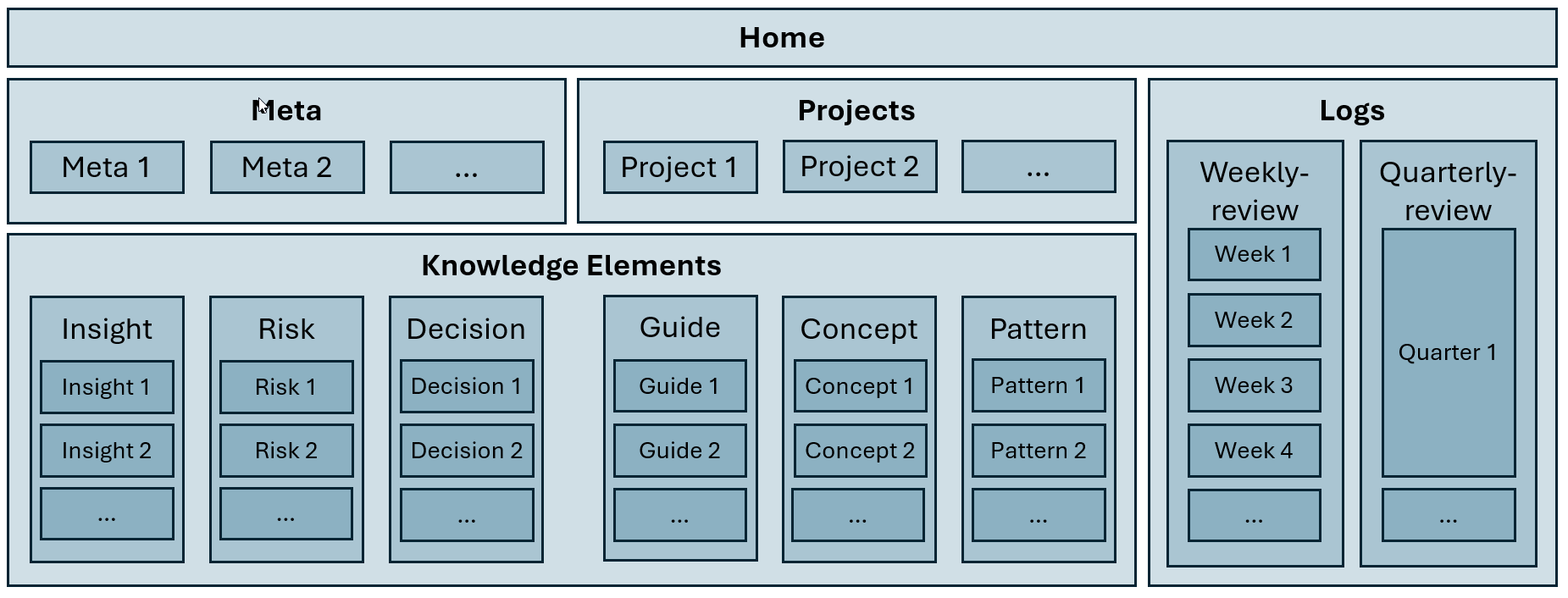 |
|---|
| LENS document hierarchy, visualization by the author by |
2.1. Home: the operational cockpit
At the top (as it is the case with most websites) there is a Home Page. This is the control center that is actively curated.
It contains:
- current focus topics
- active tensions
- critical decisions
These are the pieces of information that should always be loaded into your personal RAM. In a sense, you can think of it as a top-level summary of your work.
Example elements (through my lens as Head of Information Technology):
- integration conflicts (ERP ↔ MES)
- architectural tensions
The question the Home Page continuously answers is: “What matters right now?”
2.2 Meta pages: patterns & principles
Meta pages are one layer deeper than the Home Page.
They exist for your core topics and are actively curated. It is important not to create too many meta pages (please don’t create one for every project). Their value comes from active curation: whenever something changes within a topic (or at least every couple of days) you should review and update the page. Without regular maintenance, they quickly lose their usefulness.
Meta pages mainly capture:
- recurring issues within a topic
- structural patterns
- strategic tensions
For my personal system, I created three meta pages:
- Meta Projects: I decided not to create one meta page per larger project, but instead a single project meta page. In my role, the 5+ concurrent large projects I oversee are highly interconnected.
- Meta Department Leadership & Strategy: This meta page is my hub for leadership and strategy topics. It follows the principle “structure follows strategy”. If you lead a department, I’d recommend creating a dedicated meta page for these kinds of topics.
- Meta IT Management: This is my meta page for topics that are more operational in nature. Initially, I had separate pages for IT security, IT infrastructure and production IT. However, because these topics are so tightly interconnected, I decided to combine them into a single meta page.
I would recommend creating no more than three to five meta pages. Their main benefit comes from their actuality and relevance, which means you need to invest some effort in actively updating and curating them. If you have too many, the maintenance effort can quickly outweigh the benefit.
The question meta pages answer is: “What keeps happening?”
2.3 Projects: context hubs (not status trackers)
How are they different from meta pages, you might ask?
I use project pages as context hubs. Whenever I create (or become involved in) a new project, I create a brief project page explaining the context of the project (the why, the timeline and some dependencies).
These pages contain mostly quasi-static information, as I don’t actively curate them. I only update them when there are major changes to the project.
However, I link to these pages on a daily basis. Whenever I create a knowledge element (see next section), I check whether it relates to a project. If it does, I create a connection. With backlinks enabled (a standard feature in tools such as Obsidian, Evernote, or Logseq), you continuously collect relevant notes around a project.
And the benefit? Individual knowledge elements can be referenced by multiple projects. With a traditional folder structure, this would be much harder or simply impossible.
So, in summary, project pages are:
- not detailed status trackers
- but context anchors
They describe:
- goals
- stakeholders
- dependencies
2.4 Knowledge elements: the core unit
The deepest layer of the system consists of knowledge elements. These are distilled notes derived from raw information (such as emails, meeting notes, document summaries and similar sources).
Depending on the type of information, I use different classes of knowledge elements:
- Insight: Most knowledge elements (about 75% in my system) are insights. This is knowledge that emerges from raw information and is ready to be reused in the future.
- Risk: Some insights contain risks, but if the primary purpose of an element is to describe a risk, it is categorized as a risk.
- Decision: Similar to risks, knowledge elements that mainly revolve around a decision are labeled as decisions.
- Guide: These knowledge elements are a bit different. They are more explanatory in nature and are used when knowledge exists in a process-oriented form that may need to be applied again in the future. They are essentially how-to guides.
- Concept: These are knowledge elements that are more idea-like and exploratory.
- Pattern: These are knowledge elements that combine knowledge and information from multiple other elements and/or describe if patterns are emerging
Another important aspect of knowledge elements is their inherent structure. Every element contains the following sections:
- Context: Explains the context behind the knowledge element. Why is this relevant?
- Core Insight: This is the core of the core. It contains the actual knowledge being stored. A knowledge element can contain more than one core insight, but only if they are closely related. Otherwise, it makes sense to split them into separate knowledge elements. Depending on the type of element, this section may also contain a risk or a decision. It answers the question: “What is the relevant knowledge?”
- Implications: What do the core insights imply?
- References: This is the connection to the raw information (for example, a link to a document, a meeting note, or a search query that leads to a relevant email). While this is not needed in most situations, it provides traceability and supporting evidence when required.
- Related: Every knowledge element also receives links. These can point to other relevant knowledge elements, but also to projects, meta pages, or other related topics.
One more thing: knowledge elements are not static. If additional information is revealed at a later stage, they can be updated.
The question knowledge elements answer is: “What is worth remembering and acting upon?”
2.5 Logs: weekly evolution tracking
Besides the actively updated meta pages, knowledge is still rather stationary at this point, as there is nothing that tracks developments over time. This changes with the logs.
I tried a bunch of different approaches to keep track of changes and developments. I experimented with short daily summaries, monthly recaps and weekly write-ups. Until a couple of weeks ago, nothing really stuck. I felt that maintaining these tracking mechanisms required far more effort than their value actually was.
With my new system, I (re-)introduced weekly tracking. Every week, I do a short (max. 15–30 minutes) recap of my week in a structured way and capture:
- developments & tensions
- interconnections between knowledge elements
- open decisions
- links to all knowledge elements that were created (or updated) during that week
These logs are extremely powerful. They are essentially a snapshot of a particular week. If you revisit them later, you can quickly reload what the situation was back then: which decisions were still open, what the key challenges were and which topics were emerging. As a result, they become an effective progress tracker, allowing you to compare different weeks and see what actually changed.
They have another benefit as well: when summarized at the end of the week, they become an excellent starting point for Monday morning, helping you boot up your RAM with the latest developments and context.
Having the system some months operational, I learned that an additional log-level is beneficial and I introduced a quarterly-review. It similar to the weekly-review, but it gives a more aggregated overview and comes in handy in quarterly and yeary management meetings.
The question the logs answer is: “How did things evolve?”
That’s the skeleton of the system: five layers, each answering a different question, from “what matters right now” down to “how did things evolve.” On its own, though, a structure like this is just an empty shelf. What actually fills it (and keeps it alive week to week) is the set of workflows around it.
That’s what I’ll walk through in Part 2: how information actually gets captured from meetings and emails, how it gets turned into knowledge elements and how a brief Friday review turns the whole thing into something much closer to a decision-support system than a note archive.